
Satellite Director NG2.3.26 - Get APK
You'll be able to download in few seconds.
Publisher Description
Before buying this app: have you tried the free version ?
If you cannot install the free version your phone does not have a compass, which is required for the director or pointing function in this app. Check "Satellite Locator" which uses GPS locations to find a satellite.
This app is simular to the free Satellite
Director but has
additional features, some may require the use of internet:
- enter street and city to get your location coordinates
- your location coordinates via network and/or GPS
- find the exact location with the help Google Maps
- see in satellite view above your location where to point the dish
- create your own satellite sat-lists with only those satellites in it that you want using the build-in satellite list
- reduce and sort the satellite list without restarting the app
- on-line help pages
- 'simple' mode without balancing the phone
- export/import the satellite lists to SD card (backup)
- overrule the build-in satellite list with your own list
- vibrate
- up to 6 satellites simultaniously displayed
- display for your location and all satellites the values for: azimuth, elevation and skew
- the current location via the network
- update the satellite list from a website (sats.csv, Enigma satellites.xml, SatelliteCalculation) or a local file.
- instead of finding a satellite find an antenna by gps location or address.
Warning: metal covers/cases or covers/cases with metal/magnetic closure will influence/disrupt the compass of your phone or tablet. Do not use these covers !!
Finding a TV satellite, in azimuth, can be pretty difficult. Before you can find it with a compass you have to do some
calculations using GPS location, magnetic variation, compass azimuth and satellite azimuth.
Satellite Director replaces all of that.
Just enable the GPS in your phone or enter your GPS location or use the map to find your location,
select the desired TV satellite and point your phone to the sky to target (find) the TV satellite.
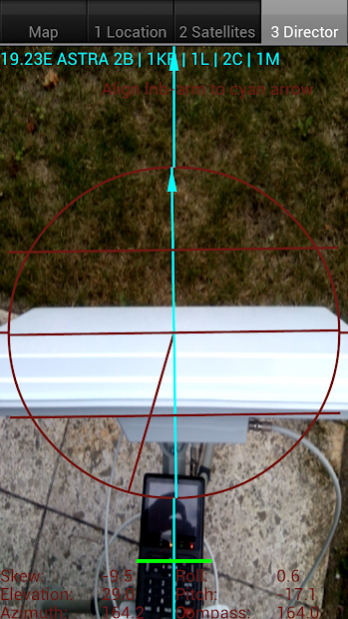
Balance your phone. You have found the satellite when the white ball is in the white circle
and the cyan ball is in the cyan circle. Align the offset arm, in azimuth, of the satellite dish to the cyan arrow on
the phones display and the satellite dish is aligned in azimuth with the satellite.
Selectable audio tone, camera preview, continuous mode (no pause), color pickers or a user defined satellite position may make it easier for you to find the desired TV satellite.
There are 2 satellite lists: an extended list with 400+ satellites and a compact list with 220+ satellites or use your own list (mailed to the phone or downloaded, see Youtube how easy it is to use.).
New phones with Android 4: remember that the "Settings" screen has options to correct the compass readings, if needed.
About Satellite Director NG
The company that develops Satellite Director NG is Zekitez. The latest version released by its developer is 2.3.26.
To install Satellite Director NG on your Android device, just click the green Continue To App button above to start the installation process. The app is listed on our website since 2017-12-09 and was downloaded 0 times. We have already checked if the download link is safe, however for your own protection we recommend that you scan the downloaded app with your antivirus. Your antivirus may detect the Satellite Director NG as malware as malware if the download link to zekitez.com.satellitedirectorng is broken.
How to install Satellite Director NG on your Android device:
- Click on the Continue To App button on our website. This will redirect you to Google Play.
- Once the Satellite Director NG is shown in the Google Play listing of your Android device, you can start its download and installation. Tap on the Install button located below the search bar and to the right of the app icon.
- A pop-up window with the permissions required by Satellite Director NG will be shown. Click on Accept to continue the process.
- Satellite Director NG will be downloaded onto your device, displaying a progress. Once the download completes, the installation will start and you'll get a notification after the installation is finished.
Program Details
System requirements
Download information
Pricing
Version History
version 2.3.26
posted on 2017-12-09
Director
but has
additional features, some may require the use of internet:
- enter street and city to get your location coordinates
- your location coordinates via network and/or GPS
- find the exact location with the help Google Maps
- see in satellite view above your location where to point the dish
- create your own satellite sat-lists with only those satellites in it that you want using the build-in satellite list
- reduce and sort the satellite list without restarting the app
- on-line help pages
- 'simple' mode without balancing the phone
- export/import the satellite lists to SD card (backup)
- overrule the build-in satellite list with your own list
- vibrate
- up to 6 satellites simultaniously displayed
- display for your location and all satellites the values for: azimuth, elevation and skew
- the current location via the network
- update the satellite list from a website (sats.csv, Enigma satellites.xml, SatelliteCalculation) or a local file.
- instead of finding a satellite find an antenna by gps location or address.
Warning: metal covers/cases or covers/cases with metal/magnetic closure will influence/disrupt the compass of your phone or tablet. Do not use these covers !!
Finding a TV satellite, in azimuth, can be pretty difficult. Before you can find it with a compass you have to do some
calculations using GPS location, magnetic variation, compass azimuth and satellite azimuth.
Satellite Director replaces all of that.
Just enable the GPS in your phone or enter your GPS location or use the map to find your location,
select the desired TV satellite and point your phone to the sky to target (find) the TV satellite.
Balance your phone. You have found the satellite when the white ball is in the white circle
and the cyan ball is in the cyan circle. Align the offset arm, in azimuth, of the satellite dish to the cyan arrow on
the phones display and the satellite dish is aligned in azimuth with the satellite.
Selectable audio tone, camera preview, continuous mode (no pause), color pickers or a user defined satellite position may make it easier for you to find the desired TV satellite.
There are 2 satellite lists: an extended list with 400+ satellites and a compact list with 220+ satellites or use your own list (mailed to the phone or downloaded, see Youtube how easy it is to use.).
New phones with Android 4: remember that the "Settings" screen has options to correct the compass readings, if needed.
version 2.3.23
posted on 2016-07-07
- Added switching between the front/back camera,,- Added settings icon to tab 1+2+3 to access the settings for phones without menu button.,- Removed 'take photo' (only a screen shot is possible).
version 2.3.14
posted on 2013-06-11
Several fixes and updates
Disclaimer
External Download
We do not host Satellite Director NG on our servers. We did not scan it for viruses, adware, spyware or other type of malware. This app is hosted by Galad and passed their terms and conditions to be listed there. We recommend caution when installing it.
The APK Download link for Satellite Director NG is provided to you by apps112.com without any warranties, representations or guarantees of any kind, so access it at your own risk.
If you have questions regarding this particular app contact the publisher directly. For questions about the functionalities of apps112.com contact us.
